
AIs
Every card comes with one AI, called the Narrator: the player says something, it answers. For the vast majority of cards, that's all you need.
If you want a talking Rat King in the cellar to speak with his own temper, or a little sprite to keep the books behind the scenes every five turns, add another AI.
Every extra AI means one more model call each time, which costs more credits. Before adding one, think about whether it really needs to be its own AI. Often one more lore entry does the job.

Where an AI lives
At the very bottom of the card and of every scenario is an AI row, one line per AI, showing its name and type. Where an AI lives is where it works:
- Living on the card: always there
- Living in a scenario: only there while that scenario is open
- Not placed (off): not active, just parked
What it knows depends on where it lives, too. On the card, it reads the card's lore. In a scenario, it reads the card's plus that scenario's. If you want some entries that only this one AI knows and no other AI does, put them in Only it knows in its settings.
You can drag an AI row straight onto another scenario or onto the card. That moves it.
Add an AI
Add → An AI call. It's added to whichever scenario you're looking at (or the card, if no scenario is selected), and its settings open on the right at the same time. The first thing at the top is choosing what kind of AI it is. To change it later, click its row and the settings open again.
Four kinds of AI
| Type | When it runs |
|---|---|
| Turn-based | Runs with the player's turns: it answers every time the player speaks, or runs behind the scenes every few turns, or waits for another AI to reply first |
| UI-based | Waits for a button in the player interface to call it |
| Code-based | Picks its own moment: when a value meets a condition, when a scenario ends, after a quiet spell |
| Custom | The kind a form can't build. You hold its place on the canvas and code makes it work (see below) |
Fine-tune it under When it runs in its settings:
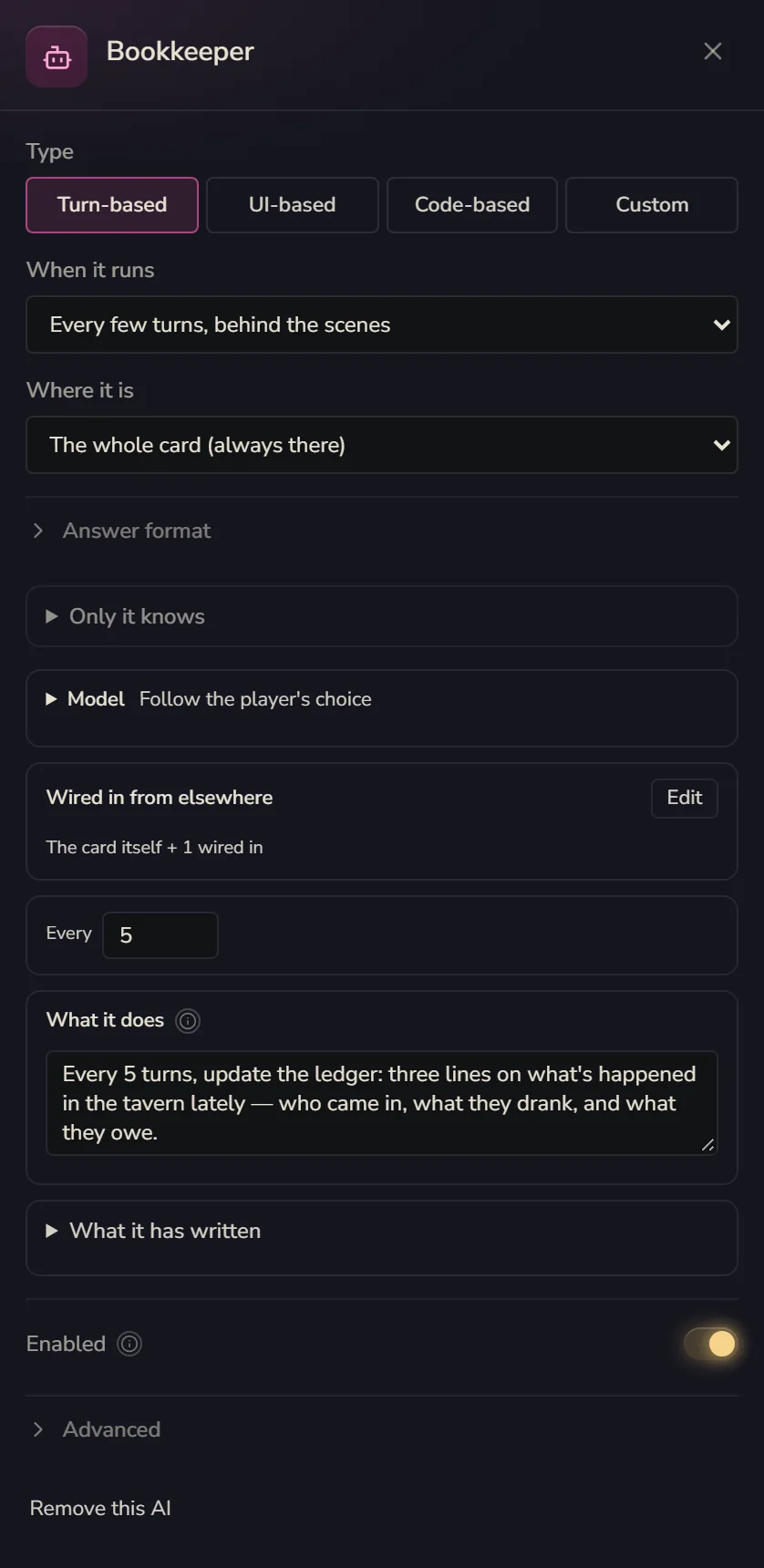
- Every time the player speaks, it replies: the ordinary Narrator kind
- Every few turns, behind the scenes: never talks to the player. Good for writing summaries and keeping the books
- Right after another AI replies: waits for the AI you pick to finish, then runs. For example, the Narrator tells the story and a sidekick chimes in with a wisecrack
- Call it from a button in the Player interface: once it's set up, go to the player interface and give a button a Call an AI step
- When a value meets a condition: runs once the moment the condition goes from false to true. If it just stays true, it doesn't keep running
- When a scenario ends: the dungeon's done, it reads through it and writes something for the next place to read. This is the most common timing for behind-the-scenes AIs
- After a quiet spell, it may cut in: if the player has the game open and nobody has said anything for that many seconds, it decides for itself whether to say something. With nothing to say it stays quiet, but every time it decides still counts as a call
Custom: leaving a spot for code
Some AIs can't be set up with a form: two characters on stage, each with rules only code can handle, or a director who only speaks up after watching what happens in the room. For those, pick Custom.
Once picked, the AI is a placeholder. It has a name, lives in a scenario, and gets to read that scenario's lore, but it won't run by itself. Code has to run it. You don't need to know how to write it. Stick a note on it saying what it should do, and the Creation assistant, or an outside AI you've hooked up with "Connect your AI", will come and write it.
Once it's written, click its row to see which file and line implement it. If nothing's written yet, it's empty and says "not implemented yet".
Group chat
When two or more AIs that answer the player are in the same place, you get a Group chat · they answer in turn: the player says something, and they reply one after another, each in their own bubble, with the speaker's name on it.
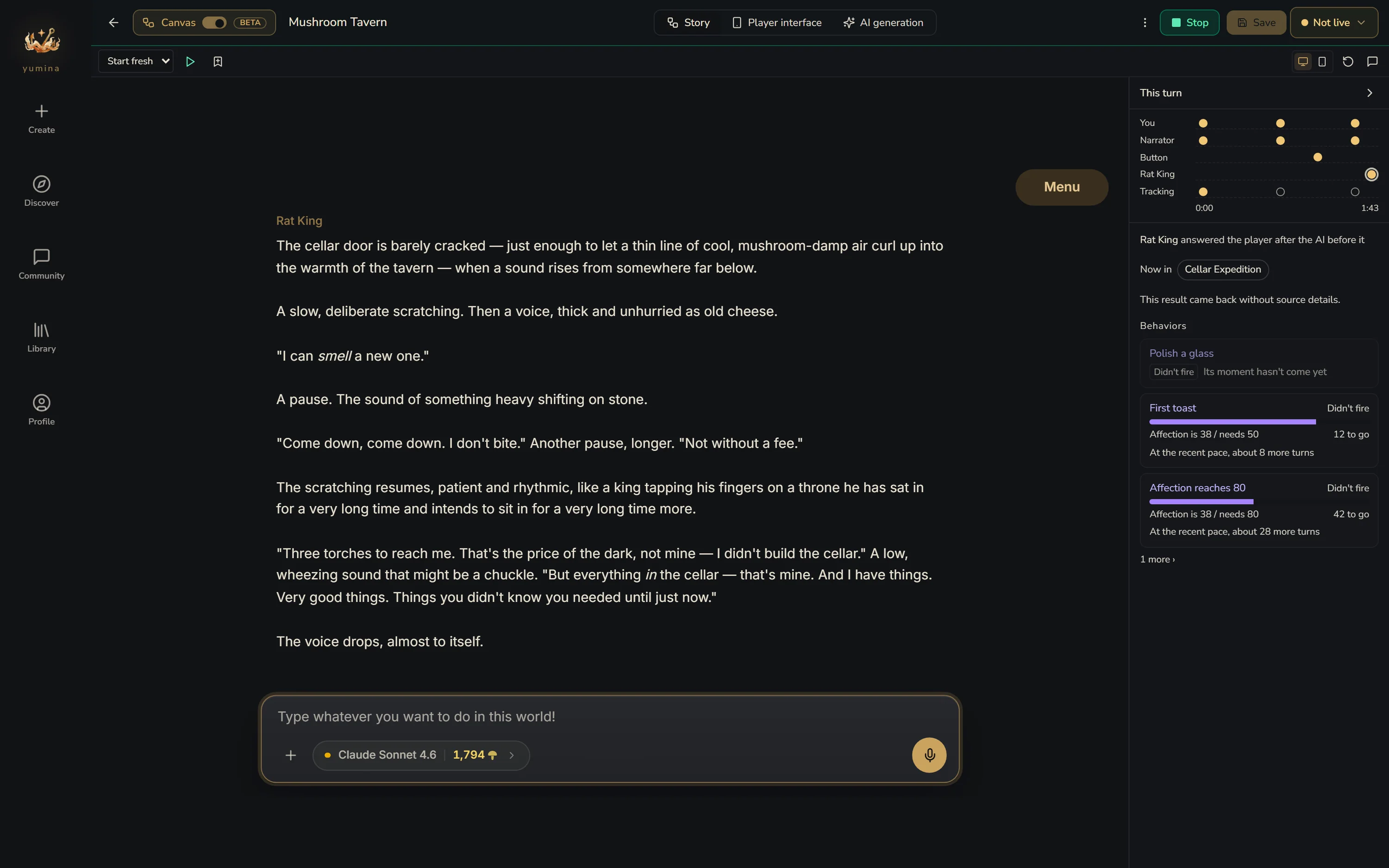

- On the card: the Narrator goes first, then the card's other AIs follow in turn
- In a scenario: when a scenario has its own AIs, by default they speak instead of the Narrator. The Narrator's row fades, and on the right there's a Card's AI too button. Click it and the Narrator stays to talk along with them. While the Narrator is there, the button changes to Card's AI out. Click that to have the Narrator step aside
When the player regenerates, the later speakers in a group chat are redone by the same AI too, so nobody ends up with someone else's lines.
Context: what the AI reads each turn
At the bottom of the card, and of every scenario, there's a Context block. Click it and the right side lists everything the AI here is handed each turn, and lets you decide a few of those things:
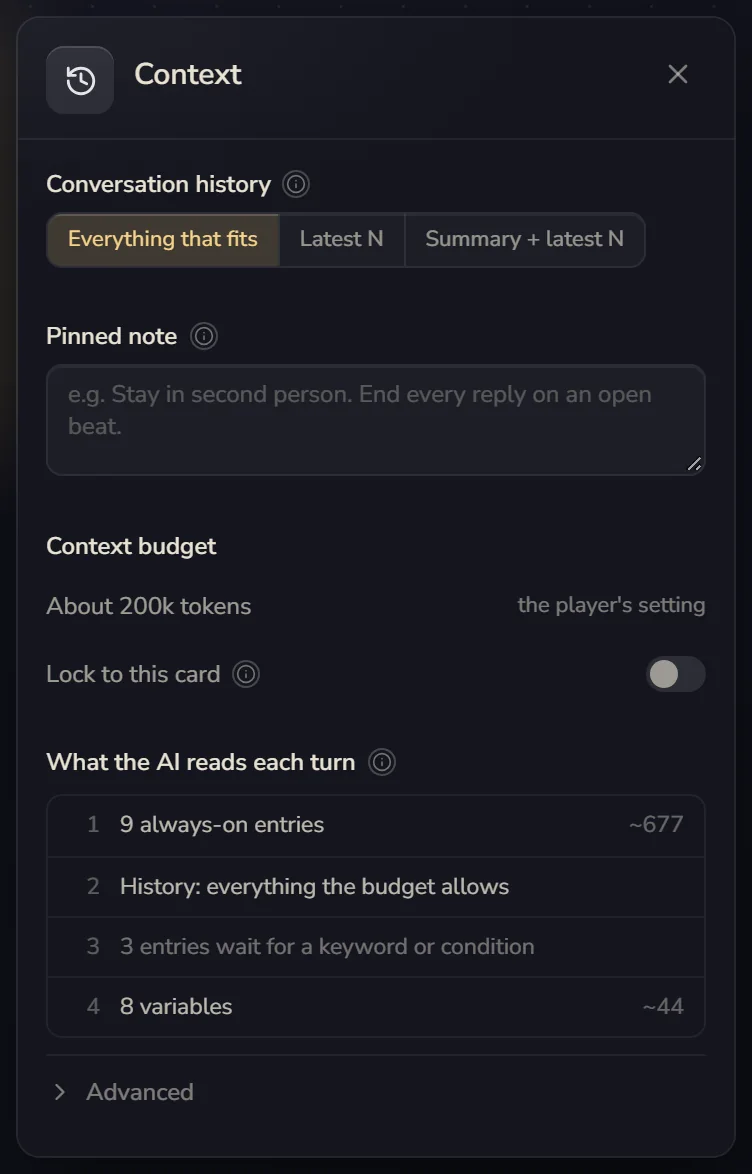
- Conversation history: Everything that fits (the default: it sends as much as it can and only drops the oldest when it runs out of room), Latest N (cheaper, but the AI forgets older things), or Summary + latest N, where turns that scroll out get folded into a summary sent ahead of the rest. With that one you can also fill in What the summary must keep, like "Keep every promise made, and who owes whom." The summary updates in the background on a cheap model and usually costs the player well under 1 mushie each time
- Pinned note: one line placed near the end of the conversation every turn, which is where the AI listens best. Style reminders and long-running rules belong here
- Context budget: how much the AI can read each turn. By default it follows the player's setting. Turn on Lock to this card and yours wins
- What the AI reads each turn: everything in the order the AI gets it (always-on lore, history, lore waiting for keywords, variables) with a rough token count. If the AI keeps forgetting things or drifts off topic, look here first
- Under Advanced you'll also find Keyword scan depth, Cascading triggers and Variables shown to the AI: All, Only changed or None
The Smart tracking switch lives in Card settings, and you'll also see it when you click the card's AI row. It's the same switch in both places.
What it remembers
Every AI's settings have a memory part and a "wired in" part:
- Remembers the whole conversation, remembers only what was said here, shares memory with someone: the same system as scenario memory
- Recent messages it reads: a combat AI might only need the last 10, for example. Cheaper, and less likely to get sidetracked by small talk from three hundred turns ago
- + Wire one in: hands it something from somewhere else to read. You can wire in a scenario's history, something a behind-the-scenes AI wrote, a scenario's variables, or a scenario's raw messages. Wired-in history can count as Lived it (something the main character went through) or Archive (records they found, not lived through). Raw messages are expensive, so use history whenever you can
This is how what a behind-the-scenes AI writes gets handed to other AIs. On the canvas this shows up as "writes for …" and "gets what … writes".
UI-based AIs and the ones that cut in after a quiet spell don't have a "wired in" part. Everything a UI-based AI sees is chosen under What it sees in Answer format below. The one that cuts in when things go quiet reads the recent conversation by itself.
Model
Model defaults to Follow the player's choice. You can also give a particular AI its own, like a chattier model for the Rat King. If the player can't use the model you picked, it falls back to the one they chose, so the card never gets stuck.
Answer format: getting a tidy answer
In an AI's settings, under Where it is, there's a folded section called Answer format. Most of the time you won't need it. It's mainly for building minigames.
Take the "Fortune Mushroom" in the tavern: when the player presses the button, it has to answer two things, a Fortune (only Great luck / Good luck / A little bad luck) and a Lucky Number (1 to 9). The fortune is said to the player. The lucky number goes into a variable.
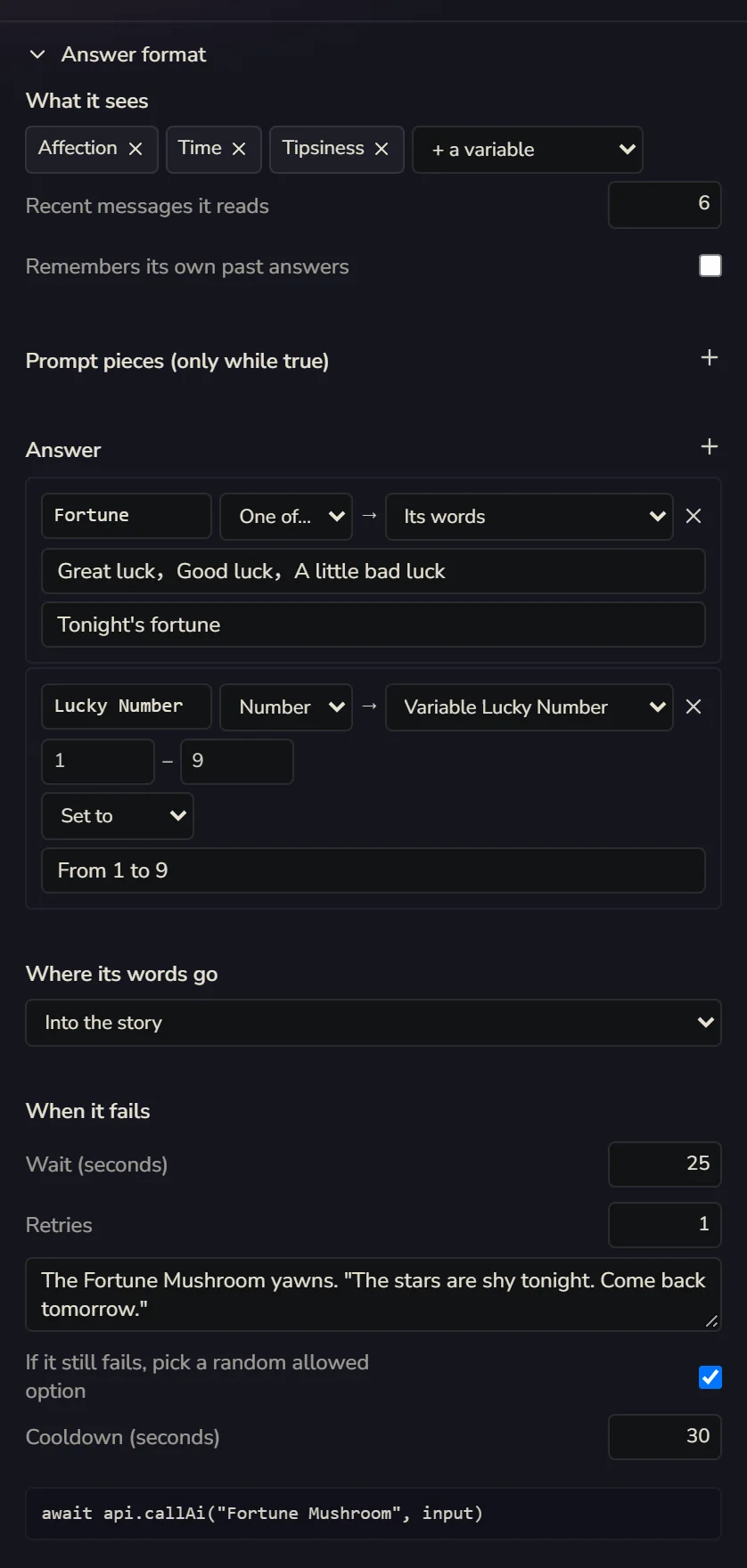
- What it sees: pick a few variables to show it, how many recent messages it reads, and whether it Remembers its own past answers
- Prompt pieces (only while true): like "When Tipsiness ≥ 5, add: The Fortune Mushroom has had too much tonight and talks in circles"
- Answer: by default it just answers with text. Add fields and it answers in JSON. Pick a type for each field (Text / Number / One of… / List), then where it goes: Its words, Variable (set to / add / append to a list), A story event, or Only returned
- Where its words go: Into the story (default), Only back to the interface, An interface channel
- When it fails: how many seconds to wait at most, how many retries, how many seconds of cooldown, and a few backup lines (one is picked at random). Tick If it still fails, pick a random allowed option, and a "One of…" field still gets a valid answer even when the model goes on strike
What comes back from the model gets checked: a "One of…" answer has to be one of the options, numbers are clamped into range. If something's off, it asks once more with a hint. If that still fails, it uses a backup line.
If you code, your card's interface code can call it directly with api.callAi("Fortune Mushroom", input) and get back { text, fields }. Details in Advanced: API Reference.
AI table
When a card has more than one AI, View → AI table shows one big table: for every lore entry and every variable, which AI can see it and which AI can change it. With lots of AIs it's easy to lose track, and this table helps you make sure the Rat King doesn't know things he shouldn't.
When the wiring doesn't work
If an AI's settings aren't complete, the canvas tells you what's wrong under This wiring cannot work. For example:
- "When it runs" isn't picked, so it will never run
- A behind-the-scenes AI has nothing wired in, so anything it writes is made up, and it still costs money
- The AI it's waiting for never replies to the player, so it'll wait forever
Follow the hints. When you're done, remember to playtest. In the playtest timeline every AI gets its own lane, so you can see who spoke and who was woken up but stayed silent.